
 by
by As one of the more Isilon-centric vSpecialists at EMC, I see a lot of questions about leveraging Isilon NFS in vSphere environments. Most of them are around the confusion of how SmartConnect works and the load balancing/distribution it provides.
Not too long ago, a question arose around mounting NFS exports from an Isilon cluster, and the methods to go about doing that.
Duncan Epping published an article recently titled How does vSphere recognize an NFS datastore?
I am not going to rehash Duncan’s content, but suffice to say, a combination of the target NAS (by IP, FQDN, or short name) and a complete NFS export path are used to create the UUID of an NFS datastore. As Duncan linked in his article, there is another good explanation by the NetApp folks here: NFS Datastore UUIDs: How They Work, and What Changed In vSphere 5
Looking back at my Isilon One Datastore or Many post, there are a couple ways to mount NFS presented datastores from an Isilon cluster if vSphere 5 is used. Previous versions of vSphere are limited to a single datastore per IP address and path.
Using vSphere 5, one of the recommended methods is to use a SmartConnect Zone name in conjunction with a given NFS export path.
In my lab, I have 3 Isilon nodes running OneFS 7.0, along with 3 ESXi hosts running vSphere 5.1. The details of the configuration is:
- Isilon Cluster running OneFS 7.0.1.1
- SmartConnect Zone with the name of mavericks.vlab.jasemccarty.com
- SmartConnect Service IP of 192.168.80.80
- Pool0 with the range of 192.168.80.81-.83 & 1 external interface for each node
- SmartConnect Advanced Connection Policy is Connection Count
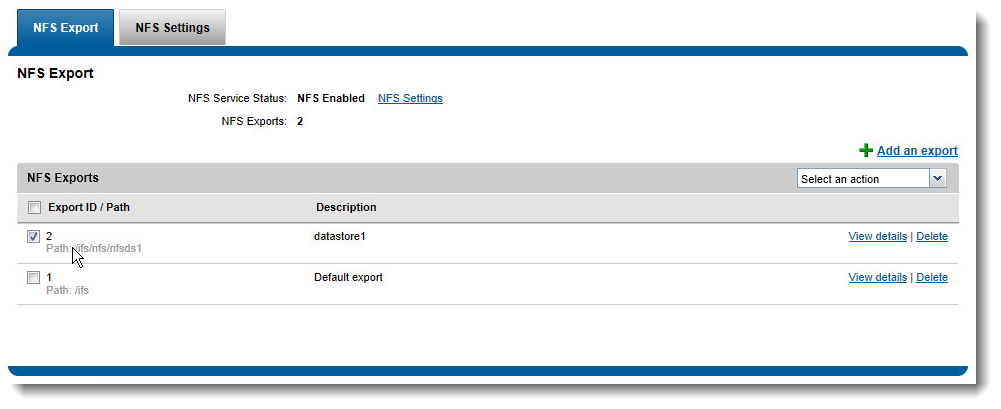
- NFS export with the following path
- /ifs/nfs/nfsds1
- vCenter Server 5.1 on Windows 2008 R2 with Web Client
- 3 ESXi hosts running vSphere 5.1
A quick note about the mount point I am using… By default an Isilon cluster provides the /ifs NFS export. I typically create folders underneath the /ifs path, and export them individually. I’m not 100% certain on VMware’s support policy on mounting subdirectories from an export, but I’ve reached out to Cormac Hogan for some clarification. Update: After speaking w/Cormac, VMware’s stance is support is provided by the NAS vendor. Isilon supports mounting subdirectories under the /ifs mount point. Personally, I have typically created multiple mount points giving me additional flexibility.
One of the biggest issues when mounting NFS datastores (as Duncan mentioned in his post), is ensuring the name (IP/FQDN) and Path (NFS Export) are named the same across all hosts. **Wake up call for those using the old vSphere Client- It is easier from the Web Client.**
If I mount the SmartConnect Zone Name (mavericks.vlab.jasemccarty.com) and my NFS mount (/ifs/nfs/nfsds1) it would look something like this:
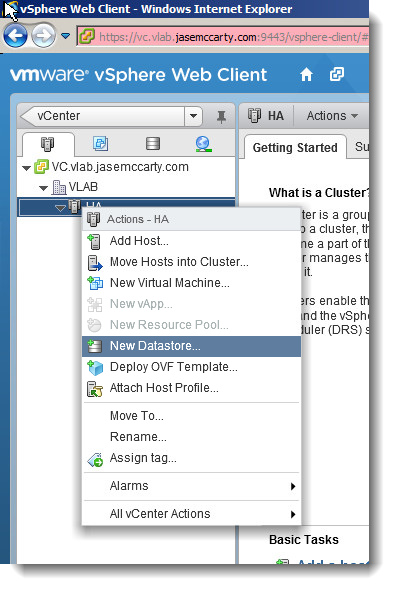
Begin by adding the datastore to the cluster (Named HA here)
Give the datastore a name (mavericks-ds1) in this case.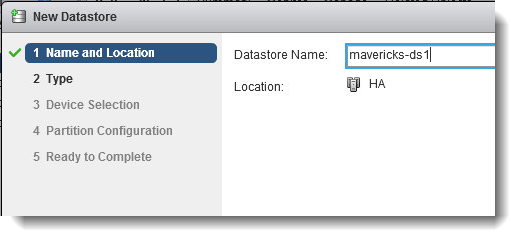
Select NFS as the type of datastore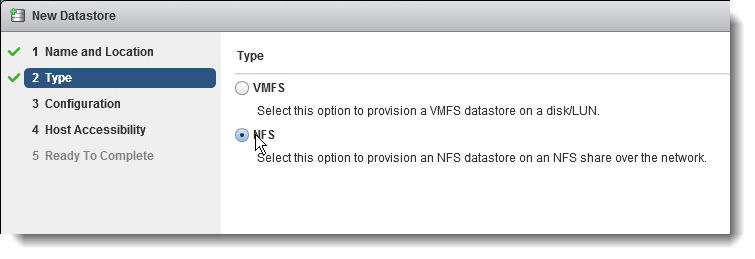
Provide the SmartConnect Zone name as the Server, and the NFS Export as the Folder
Select all hosts in the cluster to ensure they all have the datastore mounted
(this will ensure they see the same name)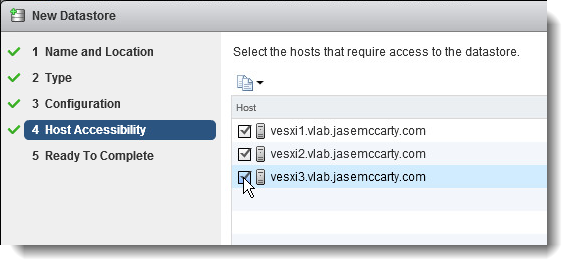
Finish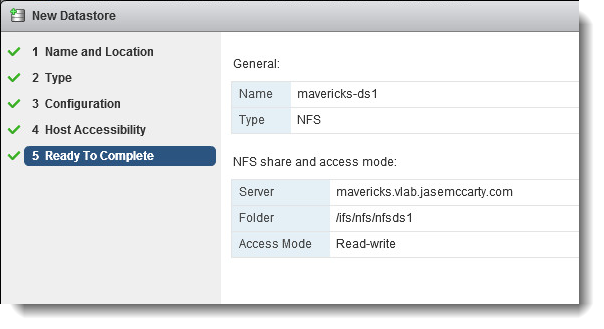
Now only a single NFS mounted datastore (with the above path) is mounted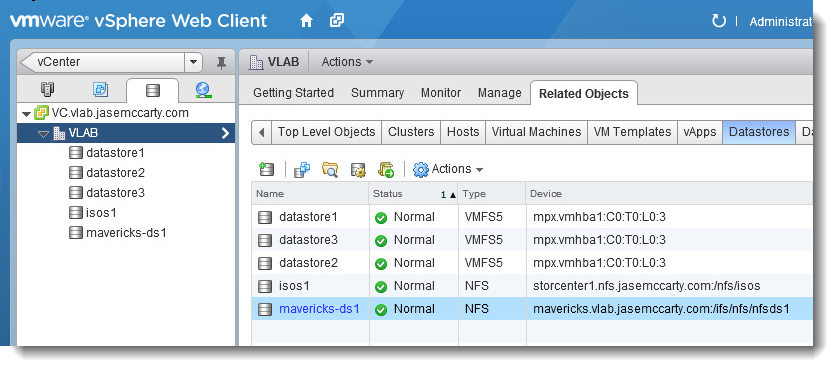
Looking further, each host sees an identical mount point.
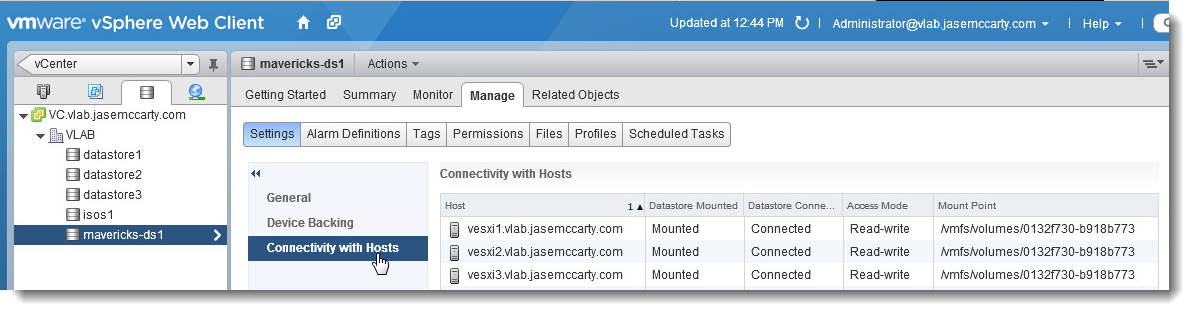 This can also be confirmed from the ESXi console on each host.
 This would lead one to believe that all hosts were talking to a single node. But are they?
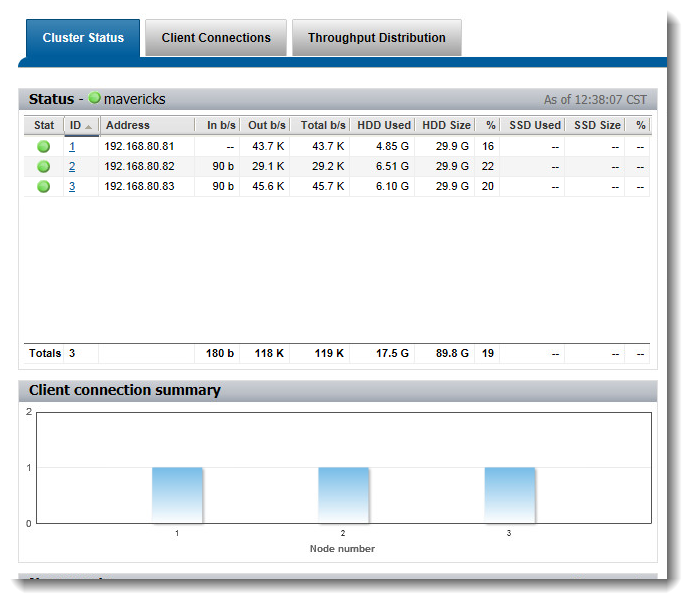
Looking at the OneFS Web Administration Interface, it is shown that each of the 3 hosts has a separate connection to each of the 3 nodes
Because each of these hosts see the same mount point, SmartConnect brings value by providing a load balancing mechanism for NFS based datastores. Even though each host sees the IP for the SmartConnect Zone differently, they all see the mounted NFS export as a single entity.
Which Connection Policy is best? That really depends on the environment. Out of the box, Round Robin is the default method. The only intelligence there is basically “Which IP was handed out last? Ok, here is the next.” Again, depending on the environment, that may be sufficient.
I personally see much more efficiency using one of the other options, which include Connection Count (which I have demonstrated here), CPU Utilization (gives out IPs based on the CPU load/per node in the cluster), or Network Throughput (based on how much traffic/per node in the cluster). Each connection policy could be relevant, depending workloads.
Another thing to keep in mind, when using a tiered approach, and SmartConnect Advanced, multiple zones can be created, with independent Connection Policies.
Hopefully this demonstrates how multiple nodes, with different IP addresses, can be presented to vSphere 5 as a single datastore.

Have best practices changes in terms of I/O optimization Settings for directories that are being used as VM datastores ?
Thanks
@dynamoxxx
That I couldn’t tell you. But I can ask. 😉
Thank you
I used smartconnect for round robin and mount my NFS datastores through FDQN. From esxi side, how I can check that the round robin is working ? I understand that each datastore I mount will resolve the FDQN by a different ip?
holala,
From the ESXi perspective, there is really no way to see the Round Robin NFS load balancing taking effect.
From the OneFS Web Administration Interface, as detailed above in the post, you can see which hosts are connected to which nodes.
Also, with Round Robin, each host could possibly mount the FQDN/Folder with a different IP, or possibly even the same IP… It all depends on how many DNS requests are resolved for the FQDN.
From a load balancing aspect, the other options have more intelligence.
Depending on your workload, number of hosts, number of VMs, etc, one of these other options could provide more effective load balancing for you.
Again, depending on your configuration, your mileage may vary.
I hope that helps!
This is very helpful info. Thank you.
Jase, I’m new to Isilon storage and your blog has proven extremely helpful to me, thank you very much.
With your help I think I now understand that by using the SmartConnect Zone I can present a single Datastore to multiple vSphere hosts, and utilise load balancing at the Isilon end of the connection.
At the vSphere host we use route based on IP hash for the NFS connection, I assume that connecting to the SmartConnect Zone FQDN will result in a different IP hash (depending on which Isilon node actually responds from the SmartConnect pool range), therefore vSphere will probably balance the load accross physical NICs at the host end too?
Stephen,
Thank you for the kudos. I am glad I could be of value to you.
Given that the FQDN can resolve to multiple IPs (after reboots, etc), I would assume so.
Check out Scott Lowe’s presentation on vSphere & NFS for some more info on how they work together: http://blog.scottlowe.org/2012/07/03/vsphere-on-nfs-design-considerations-presentation/
Thanks!
Jase
@jase
Thanks Jase, for whatever reason the slides are blocked from the office so either check them out from home or try get the access policies amended!
The reason for my asking is that currently the set up here is to have the same NFS based Datastore mounted 3 times to the hosts (connecting to the IP addresses of 3 nodes directly). This ‘load balances’ from ESX in that data written to the ‘different’ Datastores will possibly be routed through different physical NICs from the host (due to the IP hash), and go to different Isilon nodes.
But, it is very confusing seeing effectively the same Datastore 3 times, and the relies on staff building VMs across the Datastores. To me, utilisation of a SmartConnect Zone would be a neater solution.
We already use one SmartConnect Zone for CIFS shares, is there a limitation on how many you can set up? I’m using vSphere 5.0i, OneFS V6.5.
Thanks again.
Stephen,
If you have a SmartConnect Advanced license, then you can create multiple SmartConnect Zones. But remember, they will need different names, and separate DNS Delegations for each.
If your NFS network is isolated (assuming so), you can still have SmartConnect answer on your “public” for the private.
Another post (http://www.jasemccarty.com/blog/?p=2357) will show you how to configure SmartConnect properly to work with such a configuration. Then mount your datastores with the FQDN, and each host will only require a single name/mount point. Keep in mind this only works for vSphere 5.0 and higher.
Additionally, this will work with OneFS 6.5 or 7.0.
Good luck!
@jase
OK, thanks again for your help 🙂
For Isilon clusters running OneFS 6.5 and earlier, the best practice is still to use a mirrored (2x) protection setting for VMDK files. For Isilon clusters running OneFS 7.0 or later, the recommended setting for VM data has been changed to +2:1. @dynamox
Absolutely… I forgot to update my post…
Thanks James!
James,
thank you very much for your reply. My current cluster (6.5.5.12) protection is set to +2:1 so when we upgrade to 7.x i will not have to make any changes to directories used by VMware, default is good enought?
Second question: let’s say my cluster gets much bigger and i need to go to higher protection, will i need to mess with protection of VMware directories to make sure they stay at +2:1?
Thank you for your time
@dynamox
First question: if you’re already running +2:1 protection on your existing VMs, then you won’t have to change anything to take advantage of the new write optimization settings after upgrading to OneFS 7.0; default is good enough 🙂
Second question: The +2:1 protection setting is the default, no matter how many nodes are in your cluster, so as long as you leave the entire cluster at the default protection setting, you shouldn’t need to change anything with respect to your VM datastore directories. If for some reason you need to increase the protection level for all your non-VM directories, I’d suggest creating a SmartPools protection policy for your VM data that keeps the +2:1 setting intact.
Make sense?
Second question: The +2:1 protection setting is the default, no matter how many nodes are in your cluster <<- does this apply to to OneFS 6.5.5 or 7.x only ?
Thanks
It should be the default setting for both OneFS flavors.
The recommendation for VM data on earlier OneFS versions is to change the protection setting to 2x, but that requires explicit administrative action to make it happen: either by creating a SmartPools policy that sets *.vmdk files to 2x, or through the OneFS File Explorer.
If you haven’t explicitly done either of those things, then your VM data should already be at +2:1.
Previously when I was using the datastore localy on a VM, I was able to keep the old one while I’m validating the new one . Is this possible when I migrate from VM to NFS export. I mean, if I am using NFS instead of local to the VM, will this change something for the migration?
Anurag,
If I’m following your question… Is it okay to relocate a VM from a local datastore (VMFS) to an Isilon presented datastore (NFS)? Absolutely!
You can cold migrate (VM powered off), or live migrate (VM powered on) if you have appropriate vSphere licensing.
Cheers,
Jase
Sorry for responding to such an old post but we’re desperate and thought you might have seen something similar. We are adding a new esxi 5.1 host to our existing cluster but are suddenly unable to resolve our nfs smart connect zone. Our Isilon is running OneFS 7.0.2.4 and has two SC zones. The first is structured storage.domain.org and the second is structured nfs.storage.domain.org. Only the first is delegated in AD DNS servers as the second is its sub. This worked fine in the past but now we are seeing odd name resolution issues for the nfs domain. We are attempting to mount via FQDN and the IP space is private and not otherwise served by our AD DNS. Basically what we see from AD DNS debug logs is that when ESXi tries to mount nfs.storage.domain.org it asks first for a AAAA record. AD DNS forwards to SSIP and Isilon returns “nxdomain” which AD DNS passed to client. Next ESXi queries nfs.storage.domain.org.domain.org (default suffix) and AD returns nxdomain as expected. Last, ESXi queries regular A record for nfs.storage.domain.org. This time AD returns nxdomain directly. It never forwards to the SSIP. If we use just storage.domain.org to mount in the same manner then the same sequence of queries are made but the AAAA lookup returns “noerror” from SSIP and the A record query gets forwarded to the SSIP which replies with an IP and resolution succeeds.
If you have any time your thoughts would be highly appreciated.
Is this only for the new host? Or for all connected hosts now?
Have any other changes occurred to the SmartConnect configuration? Has OneFS been upgraded?
Is the new host addition the only change to the environment?
From the DNS lookups that are occurring, it would appear that the new host has a DNS issue (without more info)…
Is this host the same build as all of your other hosts?
I would suggest notifying EMC Support, so they can get a case started. They can bring a multitude of resources to bear, as well as document the resolution, should there be a code issue.
Jase,
On other hosts the only way we can test is with tools like nslookup. And they fail in the same way as the new host, but datastores are functioning some how.
SmartConnect config was not touched but OneFS was upgraded in January from 6.5.4.4 to 7.0.24.
Other than the upgrade, yes, the new host addition is really the only change that we can identify.
The new host has no particular DNS issue. We can mount the other SmartConnect zone with our external A network by FQDN, it’s just not the one we need to mount.
There is a difference in build because this build is Dell specific (drivers included) whereas the other hosts were installed from VMWare images. But as answered above, the other hosts are seeing this odd DNS behavior.
We have an EMC case open so we’ll see where that leads.
One update I can add is that from packet captures done at the Windows DNS server, the AAAA record that is first requested for nfs.storage.domain.org is returned nxdomain from Isilon SSIP whereas the response from SSIP to a AAAA query for storage.domain.org comes back as ‘no error’ with the Authoritative bit set and no answer, just asserting it is authoritative for storage.domain.org. This seems to affect the behavior of the Windows server when presented with the subsequent A record request for the SC zone. When the Isilon replies nxdomain for the AAAA record the Windows server never forwards the next A record request to the SSIP, it just replies direct to client with nxdomain (even though this is false). When the Isilon replies with the ‘no error’ Authoritative response on the AAAA record request the subsequent client request for the A record is forwarded as well as the reply with the IP.
Ah well, thanks for your response and your awseome blog!
Hi Jase,
Great blog – hope you might be able to help with a query with smart connect and datastores.
Our current ESXI and Isilon Setup uses statically mounted datastores. We have a 6 node cluster and I have created 6 datastores. Each ESXi box mounts datastore 1 over node 1’s IP, datastore 2 over node 2’s IP etc. That way we balance the network load by balancing the VM’s over the datastores.
We have a new 6 node cluster (OneFS 7.2) and I have setup with Smart Connect advanced. Following your post above I’ve mounted a single datastore using the smart conncet zone name but I have an uneven distribution of clients.
For example node 5 has 2 esxi boxes connected and node 6 has none. I have tried Round Robin and then unmounted and remounted with Connection Count with a similar result.
How can I get the connections to even out as per the 3 in your example above?
I have 12 IP’s assigned between the 6 nodes. Ideally I want 2 IP’s per node as then if a node failed, the failed node’s traffic wouldn’t all fail over to one other node, instead it would get split over 2 nodes. How would I accomplish this.
Cheers!
Nick
Any suggestions, or should I go back to mounting via IP as before?
Ideally I wanted 2 IP’s per node, as from reading best practice they say if a node fails, it’s better
Nick,
Sorry for the delay. I haven’t been in the plumbing of my blog for a little while. Also, keep in mind that I no longer work for EMC.
SmartConnect IPs:
As far as an IP count goes… The typical recommendation for a SmartConnect Zone is Node Count X (Node Count – 1) or N(N-1). In a 6 node configuration, for any SmartConnect Zone, you’d then want 6(6-1) or 6×5 IP addresses. That is 30 IP addresses. The reasoning is… If you have 6 nodes, all servicing 5 IPs each (and balanced), in the event of maintenance (or a failure), the remaining 5 nodes would service 6 IPs. Basically an equal distribution. That’s one part of the conversation.
vSphere Datastores:
Keep in mind that upon boot up, vSphere is going to “ask” the SmartConnect Service IP (via DNS Delegation) for an IP address for a SmartConnect Zone that a datastore is mounted from. For each SmartConnect Zone name/FQDN/Short name, a single IP will be resolved. So 6 datastores using the same SmartConnect Zone Naming, will all use the same IP. The only way around this, is to use different SmartConnect Zones for each different datastore. You can use wildcards to make things easier in the DNS delegation. For example, you could have isi.domain.local as the DNS delegation, and SmartConnect Zone names of ds1.isi.domain.local and ds2.isi.domain.local resolved by the SmartConnect Serivce IP. Not an issue. Makes it easier than having to perform multiple DNS Delegations. That’s another part of the conversation.
Connection Policy:
Connection policy is what determines the distribution of IPs across nodes in the SmartConnect Zone. Round Robin is the default, and Connection Count, Network Throughput, & CPU Utilization are additional choices if you’ve licensed SmartConnect Advanced. Connection count often distributes IPs evenly, but I’ve heard of cases where it didn’t. Such is your case. For that, I’d recommend escalating to EMC Support.
Thinking a little outside of the box, you don’t necessarily have to use all connections/nodes in each SmartConnect Zone. You could use 3 nodes for one zone (front end connectivity that is), and 3 nodes for another. So ds1.isi.domain.local, could use nodes1,3,5 for connectivity to vSphere, and ds2.isi.domain.local could use nodes 2,4,6 for connectivity to vSphere (or any combination thereof). You could conceivably present one connection from each node to ds1.isi.domain.local, and the other from ds2.isi.domain.local. Datastore1 would then only connect on one side of a node, and Datastore2 only on the other side of a node. There are many ways to carve things up.
The challenge that you’ll continually encounter, is when the SmartConnect Zone Connection Policy decides to move an IP. If this isn’t set to automatically move an IP, then when that IP goes offline, you’ve dropped a connection. You don’t want that. As a result, you’ll have to watch the distribution of IPs on a semi regular basis. It is just the nature of the beast with Dynamic Distribution of IPs in SmartConnect.
What I’m saying, is that you can be very creative in how to present node connections, relative to SmartConnect Zones, to “finagle” a better distribution of datastore paths to datastores. But you will have to keep an eye on it.
@Nick
Whoops, ignore the 2 paragraphs at the end… copy and past typo!